> ## Documentation Index
> Fetch the complete documentation index at: https://docs.attio.com/llms.txt
> Use this file to discover all available pages before exploring further.
# GraphQL
> How the App SDK uses GraphQL to query Attio data
The Attio App SDK exposes record and workspace data through a GraphQL API. This gives you a typed, flexible way to request exactly the data your app needs.
## Two query functions
The SDK provides two functions for running GraphQL queries. Which you use depends on how your component is structured:
* [`useQuery()`](./use-query) - A React hook that suspends the component while the query is in flight. Best suited for React components that render data directly. Multiple `useQuery()` calls in the same component run in sequence.
* [`runQuery()`](./run-query) - An async function you can call imperatively, anywhere you'd `await` a `Promise`. Best suited for event handlers and [`useAsyncCache()`](../data-fetching/use-async-cache) definitions. Multiple `runQuery()` calls within a single `useAsyncCache()` run in parallel.
## Writing queries with the GraphQL Explorer
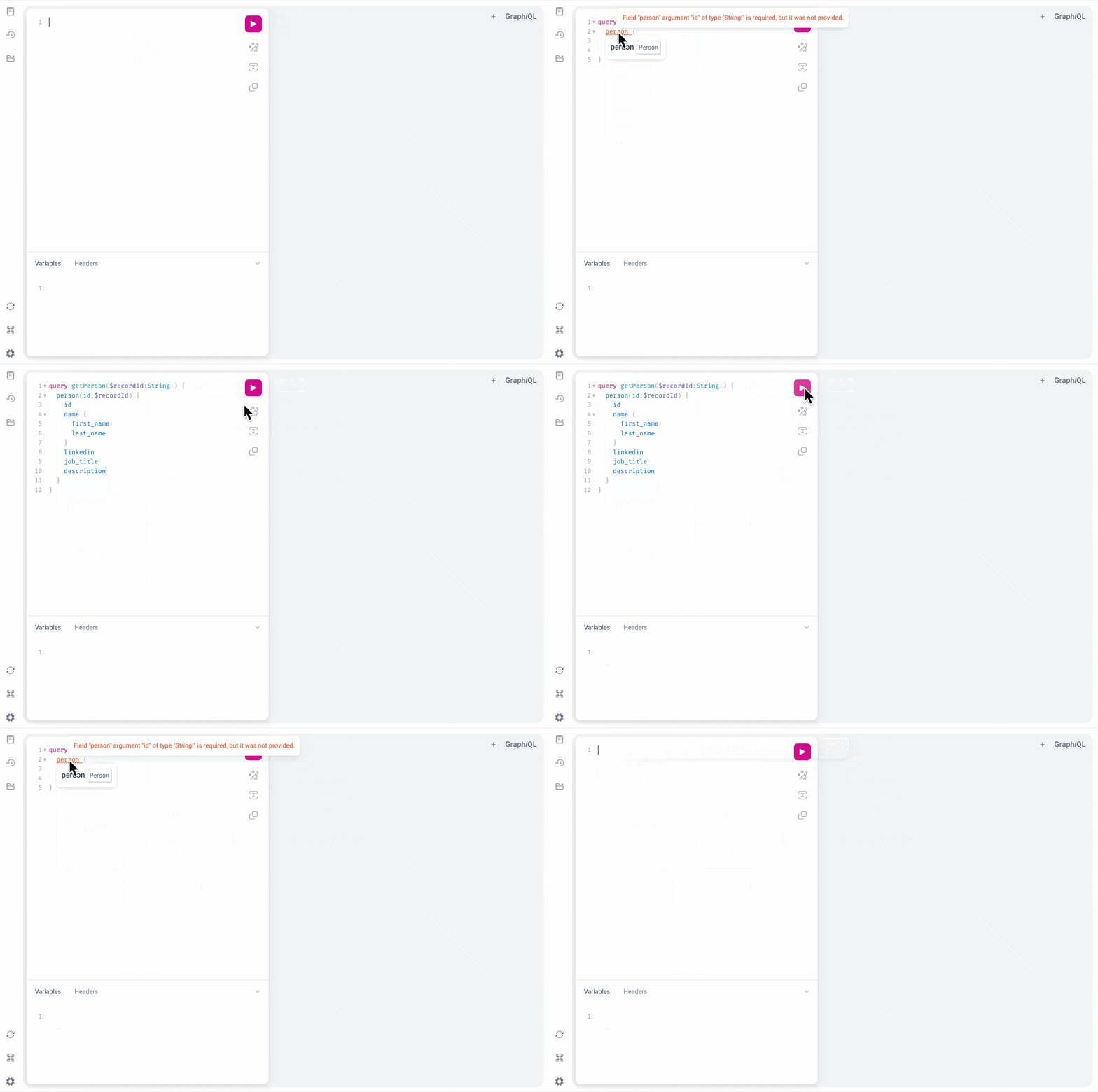
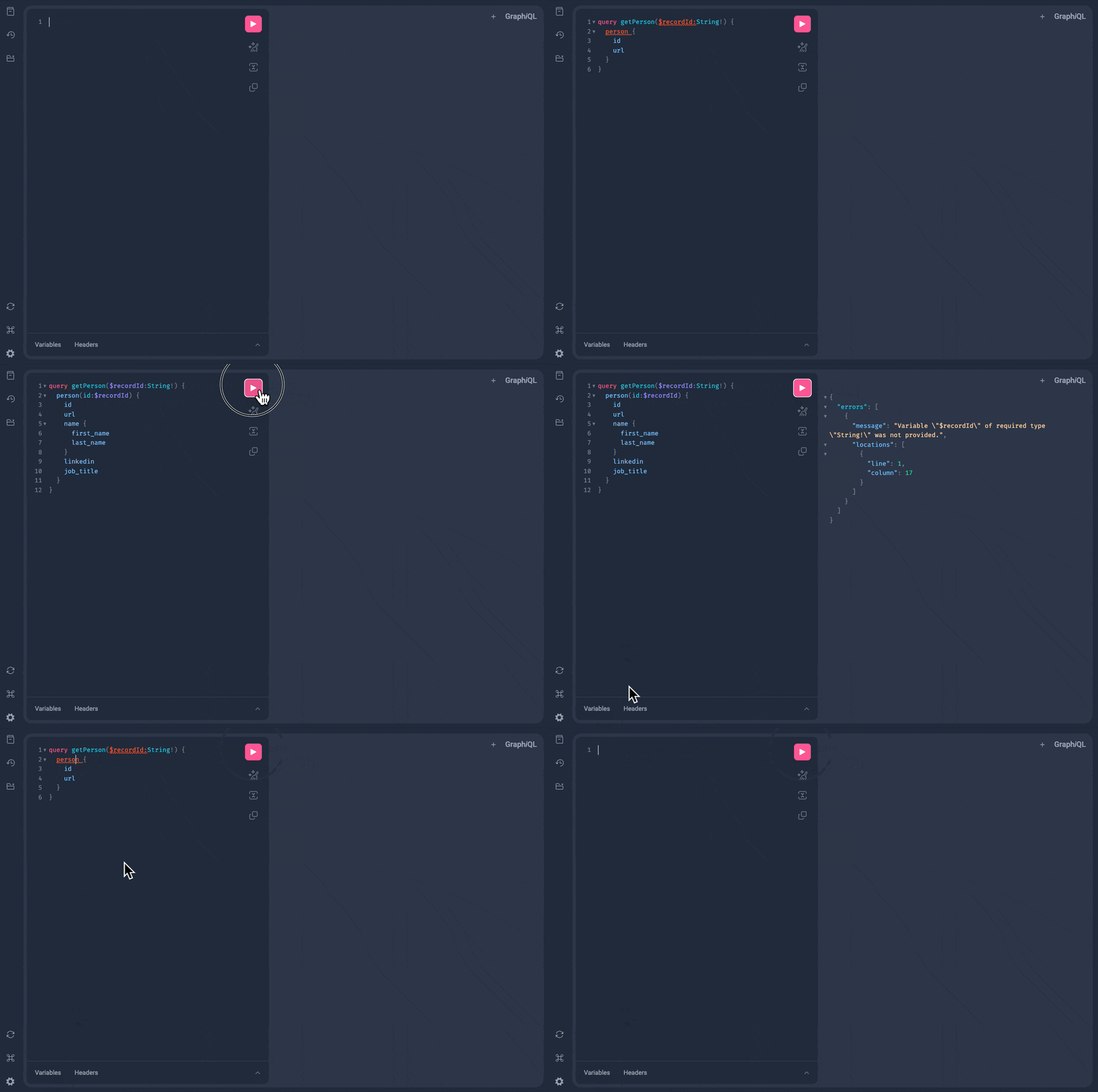
When running `npm run dev`, the development server prompts you to press `o` to open the GraphQL Explorer, an embedded instance of [GraphiQL](https://github.com/graphql/graphiql/tree/main/packages/graphiql#graphiql). It lets you explore the schema and compose queries with autocompletion.
The GraphQL Explorer is useful for writing and validating queries: the autocompletion and schema
introspection work fully. However, it is not connected to any live data source, so executing a
query returns `null` unless there are validation errors.
 ## TypeScript code generation
Both `runQuery()` and `useQuery()` accept a plain string as the query argument. However, writing your query in a `.graphql` or `.gql` file and importing it unlocks full TypeScript types on the result.
The SDK generates a `.d.ts` declaration file for each query file automatically while `npm run dev` is running. Do not edit or commit these generated files.
```graphql getCurrentUser.graphql theme={"system"}
query getCurrentUser {
currentUser {
id
name
email
}
}
```
```typescript getCurrentUser.graphql.d.ts theme={"system"}
/**
* ****************************************************
* THIS FILE IS AUTO-GENERATED AT DEVELOPMENT TIME.
*
* DO NOT EDIT DIRECTLY OR COMMIT IT TO SOURCE CONTROL.
* ****************************************************
*/
import {Query} from "attio/client"
type Exact = {[K in keyof T]: T[K]}
declare module "./getCurrentUser.graphql" {
export type GetCurrentUserQueryVariables = Exact<{[key: string]: never}>
export type GetCurrentUserQuery = {
currentUser: {id: string; name: string; email: string}
}
const value: Query
export default value
}
```
```typescript usage.tsx theme={"system"}
import {runQuery} from "attio/client"
import getCurrentUser from "./getCurrentUser.graphql"
const {currentUser} = await runQuery(getCurrentUser)
// currentUser is of type { id: string, name: string, email: string }
```
## Custom attributes
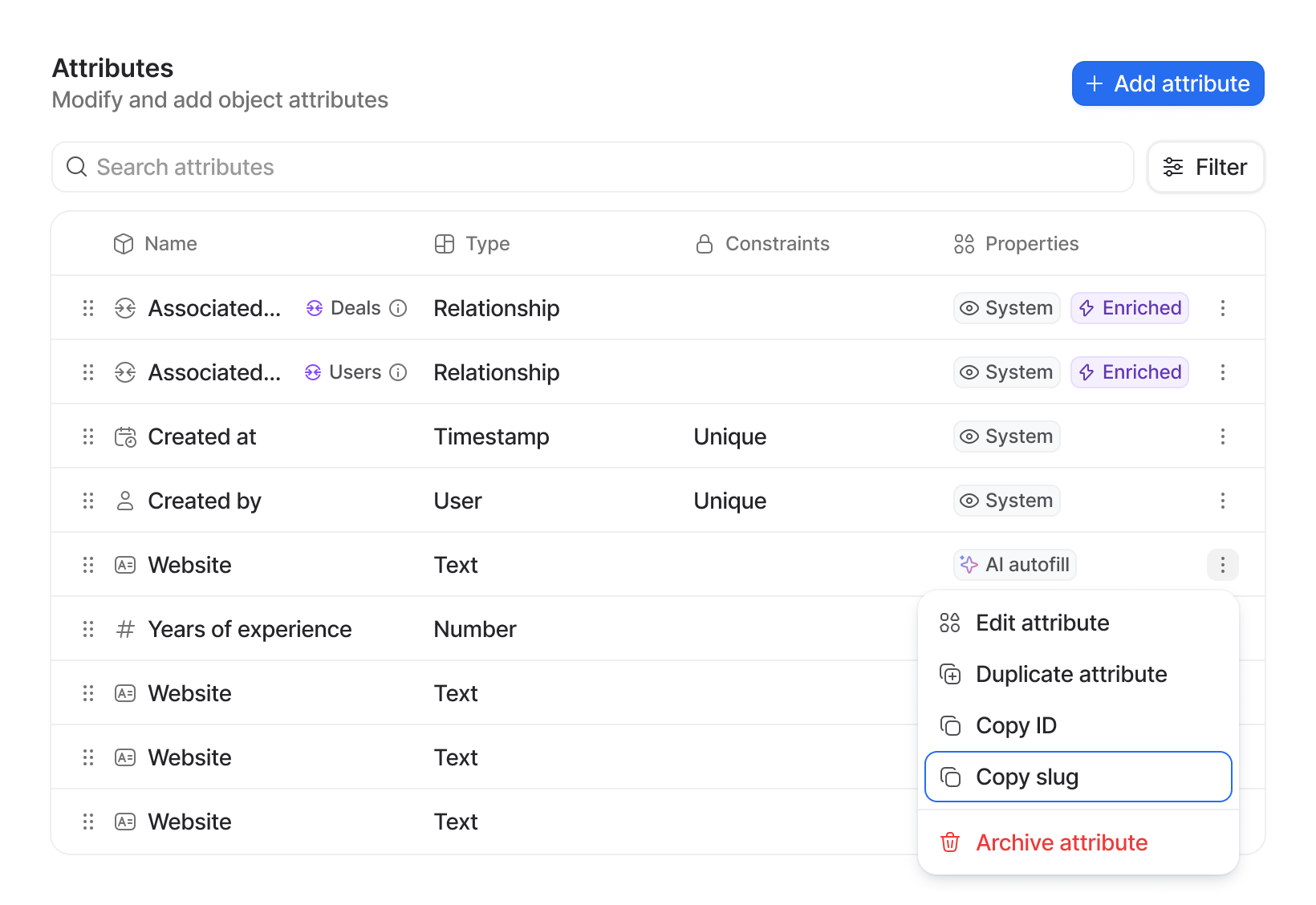
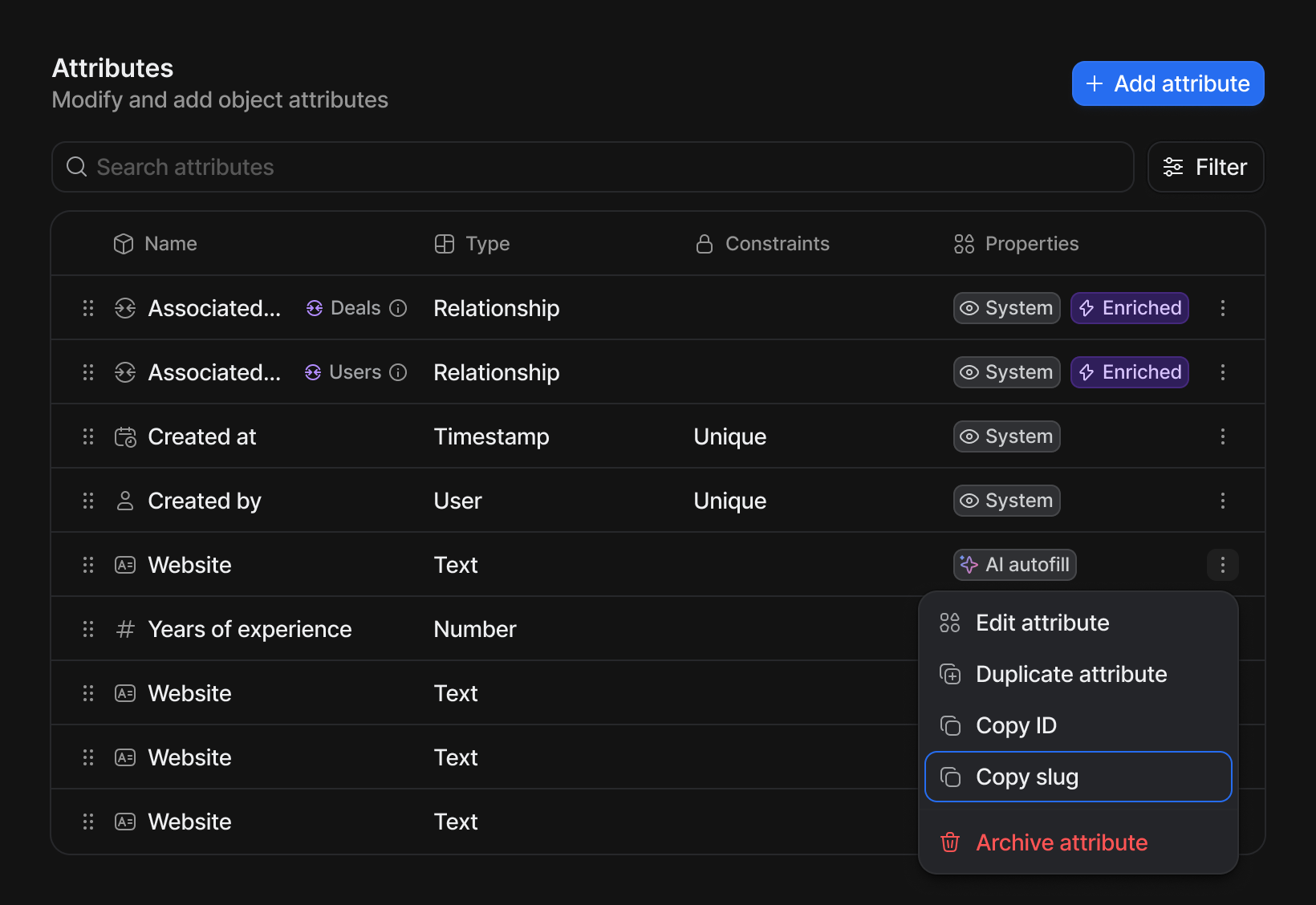
Standard object fields are available directly by name in your query. Custom attributes (those defined in Workspace settings) are accessed via the `attribute(slug: $slug)` field, using the attribute's slug.
Find an attribute's slug under the kebab menu for that attribute in Workspace settings.
## TypeScript code generation
Both `runQuery()` and `useQuery()` accept a plain string as the query argument. However, writing your query in a `.graphql` or `.gql` file and importing it unlocks full TypeScript types on the result.
The SDK generates a `.d.ts` declaration file for each query file automatically while `npm run dev` is running. Do not edit or commit these generated files.
```graphql getCurrentUser.graphql theme={"system"}
query getCurrentUser {
currentUser {
id
name
email
}
}
```
```typescript getCurrentUser.graphql.d.ts theme={"system"}
/**
* ****************************************************
* THIS FILE IS AUTO-GENERATED AT DEVELOPMENT TIME.
*
* DO NOT EDIT DIRECTLY OR COMMIT IT TO SOURCE CONTROL.
* ****************************************************
*/
import {Query} from "attio/client"
type Exact = {[K in keyof T]: T[K]}
declare module "./getCurrentUser.graphql" {
export type GetCurrentUserQueryVariables = Exact<{[key: string]: never}>
export type GetCurrentUserQuery = {
currentUser: {id: string; name: string; email: string}
}
const value: Query
export default value
}
```
```typescript usage.tsx theme={"system"}
import {runQuery} from "attio/client"
import getCurrentUser from "./getCurrentUser.graphql"
const {currentUser} = await runQuery(getCurrentUser)
// currentUser is of type { id: string, name: string, email: string }
```
## Custom attributes
Standard object fields are available directly by name in your query. Custom attributes (those defined in Workspace settings) are accessed via the `attribute(slug: $slug)` field, using the attribute's slug.
Find an attribute's slug under the kebab menu for that attribute in Workspace settings.
 Because a custom attribute can be any type, the GraphQL schema returns a union. You must include `__typename` and an inline fragment to narrow the type before reading its value:
```graphql get-bluesky.graphql theme={"system"}
query getBlueSky($recordId: String!, $slug: String!) {
person(id: $recordId) {
attribute(slug: $slug) {
__typename
... on TextValue {
value
}
}
}
}
```
You *must* include `__typename` and the `... on` syntax to match the type of the attribute you are
querying.
TypeScript also requires a type guard before you can read the value:
```typescript theme={"system"}
const {person} = useQuery(getBlueSky, {recordId, slug: "bluesky"})
const blueSkyValue = person?.attribute?.__typename === "TextValue" ? person.attribute.value : null
```
## Polymorphic results and fragments
Some queries return a union of object types. The `record` query, for example, can return a `Person`, `Company`, `Deal`, `UserRecord`, or `WorkspaceRecord`. GraphQL handles this with [fragments](https://graphql.org/learn/queries/#fragments): you declare type-specific fields per type, then switch on `__typename` at runtime.
The `record` query's `id` and `object` arguments map directly to the `recordId` and `object` parameters that [record action](../extensions/record-action) `onTrigger()` handlers receive.
```graphql get-record.gql theme={"system"}
query getRecord($recordId: String!, $object: String!) {
record(id: $recordId, object: $object) {
id
__typename
url
...PersonFragment
...CompanyFragment
...DealFragment
...UserFragment
...WorkspaceFragment
}
}
fragment PersonFragment on Person {
personName: name {
full_name
}
}
fragment CompanyFragment on Company {
companyName: name
}
fragment DealFragment on Deal {
dealName: name
}
fragment UserFragment on UserRecord {
person {
...PersonFragment
}
}
fragment WorkspaceFragment on WorkspaceRecord {
workspaceName: name
}
```
```typescript src/app/extensions/example/extension.tsx theme={"system"}
import {Extensions, runQuery} from "attio/client"
import getRecordQuery from "./get-record.gql"
import type {GetRecordQuery} from "./get-record.gql"
function getName(record: GetRecordQuery["record"]) {
switch (record?.__typename) {
case "Person":
return record.personName?.full_name ?? null
case "Company":
return record.companyName ?? null
case "Deal":
return record.dealName ?? null
case "WorkspaceRecord":
return record.workspaceName ?? null
case "UserRecord":
return record.person?.personName?.full_name ?? null
default:
return null
}
}
export default Extensions.defineExtension({
type: "record-action",
id: "example",
label: "Example",
onTrigger: async ({recordId, object}) => {
const {record} = await runQuery(getRecordQuery, {recordId, object})
const name = getName(record)
// do something with the name
},
})
```
```typescript src/app/extensions/example/extension.jsx theme={"system"}
import {Extensions, runQuery} from "attio/client"
import getRecordQuery from "./get-record.gql"
function getName(record) {
switch (record?.__typename) {
case "Person":
return record.personName?.full_name ?? null
case "Company":
return record.companyName ?? null
case "Deal":
return record.dealName ?? null
case "WorkspaceRecord":
return record.workspaceName ?? null
case "UserRecord":
return record.person?.personName?.full_name ?? null
default:
return null
}
}
export default Extensions.defineExtension({
type: "record-action",
id: "example",
label: "Example",
onTrigger: async ({recordId, object}) => {
const {record} = await runQuery(getRecordQuery, {recordId, object})
const name = getName(record)
// do something with the name
},
})
```
## Example queries
```graphql theme={"system"}
query getCurrentUser {
currentUser {
id
name
email
}
}
```
```graphql theme={"system"}
query getPersonEmailAddresses($recordId: String!) {
person(id: $recordId) {
email_addresses
}
}
```
```graphql theme={"system"}
query getTeam($recordId: String!) {
company(id: $recordId) {
team {
name {
full_name
}
email_addresses
}
}
}
```
Because a custom attribute can be any type, the GraphQL schema returns a union. You must include `__typename` and an inline fragment to narrow the type before reading its value:
```graphql get-bluesky.graphql theme={"system"}
query getBlueSky($recordId: String!, $slug: String!) {
person(id: $recordId) {
attribute(slug: $slug) {
__typename
... on TextValue {
value
}
}
}
}
```
You *must* include `__typename` and the `... on` syntax to match the type of the attribute you are
querying.
TypeScript also requires a type guard before you can read the value:
```typescript theme={"system"}
const {person} = useQuery(getBlueSky, {recordId, slug: "bluesky"})
const blueSkyValue = person?.attribute?.__typename === "TextValue" ? person.attribute.value : null
```
## Polymorphic results and fragments
Some queries return a union of object types. The `record` query, for example, can return a `Person`, `Company`, `Deal`, `UserRecord`, or `WorkspaceRecord`. GraphQL handles this with [fragments](https://graphql.org/learn/queries/#fragments): you declare type-specific fields per type, then switch on `__typename` at runtime.
The `record` query's `id` and `object` arguments map directly to the `recordId` and `object` parameters that [record action](../extensions/record-action) `onTrigger()` handlers receive.
```graphql get-record.gql theme={"system"}
query getRecord($recordId: String!, $object: String!) {
record(id: $recordId, object: $object) {
id
__typename
url
...PersonFragment
...CompanyFragment
...DealFragment
...UserFragment
...WorkspaceFragment
}
}
fragment PersonFragment on Person {
personName: name {
full_name
}
}
fragment CompanyFragment on Company {
companyName: name
}
fragment DealFragment on Deal {
dealName: name
}
fragment UserFragment on UserRecord {
person {
...PersonFragment
}
}
fragment WorkspaceFragment on WorkspaceRecord {
workspaceName: name
}
```
```typescript src/app/extensions/example/extension.tsx theme={"system"}
import {Extensions, runQuery} from "attio/client"
import getRecordQuery from "./get-record.gql"
import type {GetRecordQuery} from "./get-record.gql"
function getName(record: GetRecordQuery["record"]) {
switch (record?.__typename) {
case "Person":
return record.personName?.full_name ?? null
case "Company":
return record.companyName ?? null
case "Deal":
return record.dealName ?? null
case "WorkspaceRecord":
return record.workspaceName ?? null
case "UserRecord":
return record.person?.personName?.full_name ?? null
default:
return null
}
}
export default Extensions.defineExtension({
type: "record-action",
id: "example",
label: "Example",
onTrigger: async ({recordId, object}) => {
const {record} = await runQuery(getRecordQuery, {recordId, object})
const name = getName(record)
// do something with the name
},
})
```
```typescript src/app/extensions/example/extension.jsx theme={"system"}
import {Extensions, runQuery} from "attio/client"
import getRecordQuery from "./get-record.gql"
function getName(record) {
switch (record?.__typename) {
case "Person":
return record.personName?.full_name ?? null
case "Company":
return record.companyName ?? null
case "Deal":
return record.dealName ?? null
case "WorkspaceRecord":
return record.workspaceName ?? null
case "UserRecord":
return record.person?.personName?.full_name ?? null
default:
return null
}
}
export default Extensions.defineExtension({
type: "record-action",
id: "example",
label: "Example",
onTrigger: async ({recordId, object}) => {
const {record} = await runQuery(getRecordQuery, {recordId, object})
const name = getName(record)
// do something with the name
},
})
```
## Example queries
```graphql theme={"system"}
query getCurrentUser {
currentUser {
id
name
email
}
}
```
```graphql theme={"system"}
query getPersonEmailAddresses($recordId: String!) {
person(id: $recordId) {
email_addresses
}
}
```
```graphql theme={"system"}
query getTeam($recordId: String!) {
company(id: $recordId) {
team {
name {
full_name
}
email_addresses
}
}
}
```